Signs Your QuickBooks Needs Cleanup
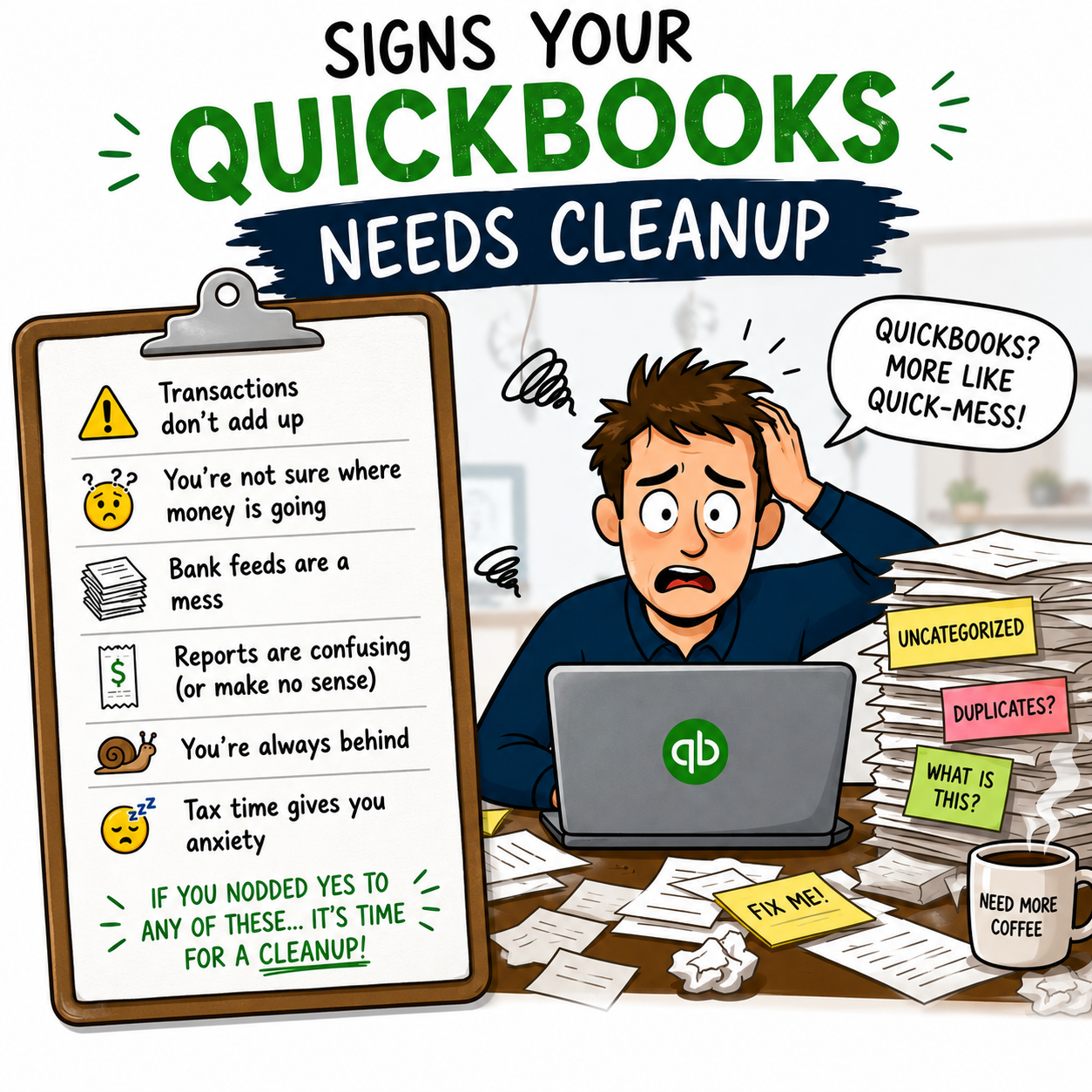
QuickBooks is one of the most useful tools a small business can use to manage its finances. But when QuickBooks is not set up correctly, not updated regularly, or filled with old errors, it can quickly become confusing.
A messy QuickBooks file can make your financial reports unreliable, your tax preparation more stressful, and your business decisions less accurate.
At Simon Bookkeeping, we provide QuickBooks cleanup services for startups, entrepreneurs, and small businesses in Bergen County, NJ, including Paramus, Hackensack, Ridgewood, and surrounding North Jersey areas. We also offer secure remote QuickBooks cleanup and bookkeeping services for clients nationwide.
If your numbers do not look right, your accounts are not reconciled, or your reports are hard to trust, it may be time to clean up QuickBooks.
What Is QuickBooks Cleanup?
QuickBooks cleanup is the process of reviewing, correcting, and organizing your QuickBooks file so your financial records are more accurate and easier to understand.
Cleanup may include fixing transaction categories, reconciling accounts, reviewing duplicate entries, organizing your chart of accounts, correcting opening balances, and identifying issues that may be affecting your financial reports.
The goal is to make your QuickBooks file cleaner, more accurate, and more useful for bookkeeping, reporting, and tax preparation.
Why QuickBooks Cleanup Matters
Your QuickBooks file is only helpful if the information inside it is accurate.
If transactions are miscategorized, accounts are not reconciled, or old errors remain unresolved, your financial reports may not reflect what is actually happening in your business.
QuickBooks cleanup helps business owners:
Improve financial accuracy
Prepare cleaner records for tax season
Understand true income and expenses
Fix duplicate or missing transactions
Reconcile bank and credit card accounts
Organize the chart of accounts
Improve profit and loss reporting
Make better business decisions
Reduce stress when sharing records with an accountant or tax preparer
Clean books give you more confidence in your numbers.
Sign 1: Your Bank Balances Do Not Match QuickBooks
One of the clearest signs your QuickBooks needs cleanup is when your bank account balance does not match what appears in QuickBooks.
This can happen because of missing transactions, duplicate transactions, unreconciled accounts, incorrect opening balances, or transactions entered manually instead of properly matched.
If your QuickBooks balance and actual bank balance are far apart, your reports may not be reliable.
A bookkeeper can review your accounts, identify the differences, and help reconcile your records correctly.
Sign 2: You Have Many Uncategorized Transactions
Uncategorized transactions are common when business owners connect bank feeds but do not regularly review and assign transactions to the correct categories.
When too many transactions are left uncategorized, your profit and loss report becomes incomplete or misleading.
For example, expenses that should be categorized as software, meals, contractor payments, supplies, or professional services may all sit in a generic uncategorized account.
This makes it harder to understand where your money is going and can create extra work during tax season.
Sign 3: Your Profit and Loss Report Looks Wrong
Your profit and loss report should give you a clear view of your income, expenses, and profitability.
If your P&L report looks strange, incomplete, or inconsistent, your QuickBooks file may need cleanup.
Warning signs include:
Income looks too high or too low
Expenses are missing
Expense categories look incorrect
Large negative numbers appear
Old transactions show in the wrong period
Personal expenses are mixed with business expenses
Duplicate income appears
Reports do not match what you expected
A clean profit and loss report helps you understand how your business is really performing.
Sign 4: You See Duplicate Transactions
Duplicate transactions can happen when bank feeds import transactions more than once, when transactions are entered manually and then matched incorrectly, or when accounts are connected improperly.
Duplicates can make income or expenses appear higher than they actually are.
This can affect:
Profit and loss reports
Tax records
Cash flow visibility
Account balances
Business decision-making
QuickBooks cleanup helps identify and correct duplicates so your records are more accurate.
Sign 5: Your Accounts Have Not Been Reconciled
Reconciliation is one of the most important parts of bookkeeping. It confirms that the transactions in QuickBooks match your actual bank and credit card statements.
If your accounts have not been reconciled for several months, your books may not be accurate.
Unreconciled accounts can hide missing transactions, duplicate entries, incorrect balances, or categorization mistakes.
Monthly reconciliation helps keep your books current and prevents small issues from becoming larger problems.
Sign 6: Your Chart of Accounts Is Disorganized
The chart of accounts is the structure used to organize your business income, expenses, assets, liabilities, and equity.
If your chart of accounts has too many categories, duplicate accounts, unclear labels, or categories that do not fit your business, your reports may become difficult to read.
For example, you may have several similar expense categories that should be combined, or important categories may be missing.
A cleaner chart of accounts makes your financial reports easier to understand and more useful.
Sign 7: Personal and Business Transactions Are Mixed Together
Mixing personal and business transactions can make bookkeeping more complicated and create confusion when reviewing expenses.
If personal purchases appear in your business QuickBooks file, your reports may not accurately reflect business activity.
This can also create extra work when preparing records for tax season.
QuickBooks cleanup can help identify and properly classify personal transactions so your business records are cleaner.
Sign 8: Your Accountant or Tax Preparer Keeps Asking Questions
If your accountant or tax preparer frequently asks for corrections, missing details, or cleaner reports, that may be a sign your QuickBooks needs cleanup.
Messy books can slow down tax preparation and make it harder for your tax professional to work efficiently.
Clean bookkeeping helps your accountant or tax preparer receive better information, which can reduce confusion and back-and-forth communication.
Sign 9: You Are Behind on Bookkeeping
If your bookkeeping is several months behind, your QuickBooks file may need more than regular maintenance.
Catching up requires reviewing past transactions, categorizing income and expenses, reconciling accounts, and checking reports for accuracy.
The longer bookkeeping is delayed, the more difficult it can become to understand what happened financially in your business.
Simon Bookkeeping can help bring your books up to date and set up a process to keep them organized going forward.
Sign 10: You Do Not Trust Your Financial Reports
This is one of the most important signs.
If you look at your QuickBooks reports and think, “These numbers do not seem right,” then your books may need professional review.
Business owners rely on financial reports to make decisions about pricing, expenses, hiring, taxes, and growth. If the reports are inaccurate, those decisions become harder.
QuickBooks cleanup helps restore confidence in your numbers.
What Is Included in QuickBooks Cleanup?
Every cleanup project is different, but QuickBooks cleanup may include:
Reviewing bank and credit card feeds
Categorizing uncategorized transactions
Fixing miscategorized transactions
Removing or correcting duplicate entries
Reconciling accounts
Reviewing opening balances
Cleaning up the chart of accounts
Reviewing accounts receivable and accounts payable
Checking income and expense categories
Identifying missing information
Preparing cleaner financial reports
Organizing records for tax readiness
The purpose is to create a more accurate bookkeeping foundation.
QuickBooks Cleanup vs. Monthly Bookkeeping
QuickBooks cleanup and monthly bookkeeping are related, but they are not the same.
QuickBooks cleanup is usually a corrective project. It fixes past issues, brings records up to date, and organizes messy books.
Monthly bookkeeping is ongoing maintenance. It keeps your records accurate going forward through regular transaction review, account reconciliation, and financial reporting.
Many businesses need cleanup first, then monthly bookkeeping afterward to prevent the same issues from happening again.
When Is the Best Time to Clean Up QuickBooks?
The best time to clean up QuickBooks is before you urgently need accurate reports.
Common times to request cleanup include:
Before tax season
Before applying for financing
Before hiring or expanding
Before reviewing profitability
Before switching bookkeepers
After months of falling behind
After noticing report errors
Before making major business decisions
Cleaning up QuickBooks early can save time and reduce stress later.
QuickBooks Cleanup for Bergen County, NJ Businesses
Simon Bookkeeping provides QuickBooks cleanup services for small businesses in Bergen County, NJ and surrounding North Jersey areas, including Paramus, Hackensack, and Ridgewood.
Local businesses often need reliable bookkeeping support that is flexible, professional, and easy to work with. Simon Bookkeeping helps business owners organize their QuickBooks records so they can better understand their finances and prepare for tax season with more confidence.
Remote QuickBooks Cleanup Services
You do not need to be located in Bergen County to work with Simon Bookkeeping.
We also provide secure remote QuickBooks cleanup services for clients nationwide. Remote cleanup allows business owners to get professional bookkeeping support without needing an in-person meeting.
Using secure document sharing and online accounting access, Simon Bookkeeping can help review, organize, and clean up your QuickBooks file from anywhere.
How Simon Bookkeeping Can Help
Simon Bookkeeping helps startups, entrepreneurs, and growing small businesses clean up and maintain their financial records.
Our services include:
QuickBooks cleanup
QuickBooks setup
Monthly bookkeeping
Payroll support
1099 filing assistance
Financial reporting
Tax-ready bookkeeping support
Remote bookkeeping services
Our goal is to help you gain clarity and control over your finances so you can focus on growing your business with confidence.
Book a QuickBooks Cleanup Consultation
If your QuickBooks file is messy, outdated, or confusing, you do not have to fix it alone.
Simon Bookkeeping provides reliable QuickBooks cleanup services for businesses in Bergen County, NJ, North Jersey, and nationwide through secure remote support.
Contact Simon Bookkeeping today to book a QuickBooks cleanup consultation and get your books organized, accurate, and tax-ready.
Book Your Free Consultation
〰️
Book Your Free Consultation 〰️
Frequently Asked Questions
What is QuickBooks cleanup?
QuickBooks cleanup is the process of reviewing, correcting, and organizing your QuickBooks file so your financial records are more accurate and easier to understand.
How do I know if my QuickBooks needs cleanup?
Your QuickBooks may need cleanup if your bank balances do not match, transactions are uncategorized, reports look wrong, accounts are unreconciled, or you do not trust your numbers.
Can Simon Bookkeeping clean up QuickBooks Online?
Yes. Simon Bookkeeping provides QuickBooks cleanup support for small businesses that need help organizing and correcting their QuickBooks records.
How long does QuickBooks cleanup take?
The timeline depends on how far behind your books are, how many accounts you have, and how complex the cleanup is.
Should I clean up QuickBooks before tax season?
Yes. Cleaning up QuickBooks before tax season can help make your records more organized and easier to share with your tax professional.
What happens after QuickBooks cleanup?
After cleanup, many businesses move into monthly bookkeeping to keep records accurate and prevent the same issues from returning.
Do you offer remote QuickBooks cleanup?
Yes. Simon Bookkeeping offers secure remote QuickBooks cleanup services for clients nationwide.
